How do you switch Claude Code accounts without a third-party tool?
Inside Claude Code, use /login to authenticate or switch accounts. Complete the provider’s browser flow, then use /status to confirm the account and /usage to inspect its current limits.
/login
/status
/usage
This is the source-of-truth path and the right fallback whenever a saved login has expired. Anthropic documents /login, /status, and /usage in the Claude Code command reference.
For keeping several accounts side by side, Anthropic’s documented method is a separate CLAUDE_CONFIG_DIR per account, and each directory gets its own Keychain entry. It works, at the cost of launching Claude Code with the right directory every time and maintaining settings and MCP configuration in each one.
Nothing below replaces this flow. Every account still has to be authenticated by Anthropic at least once, through Anthropic’s own browser flow, before any tool can save it.
Why do multiple Claude Code accounts become awkward?
The official flow handles one login, but it is not a profile manager. Moving repeatedly between a personal subscription and an employer-managed account can create three practical problems:
- Identity uncertainty: a terminal may still be using a different account than the browser window beside it.
- Repeated authentication: switching manually means revisiting the browser flow and selecting the intended organization again.
- Over-broad profile workarounds: copying or replacing an entire Claude configuration directory can fragment history or duplicate settings, plugins, instructions, and MCP configuration.
The third one causes the most damage. A script that swaps whole directories moves far more than authentication, and the loss usually shows up later — a missing MCP server, a permission prompt you had already answered, an instructions file that reverted.
Before working with company or client code, verify the active identity rather than inferring it from the last browser account you used.
What should a switch actually write?
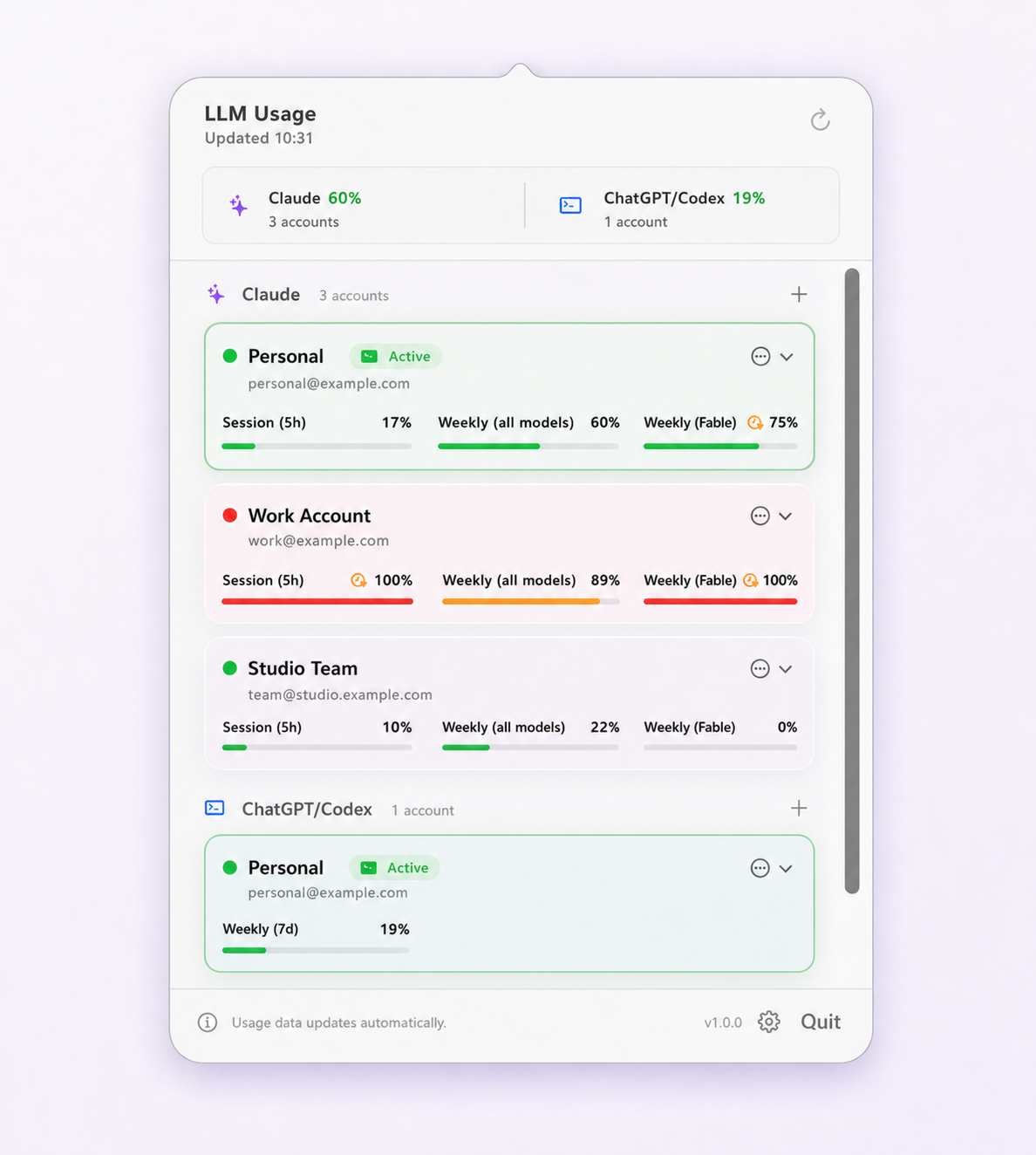
Limit Lifeboat registers the account that is currently authenticated by Claude Code and stores an app-managed credential snapshot in macOS Keychain. Once work and personal accounts are registered, the menu-bar view shows their identities, current or last-known usage, and which account is active.
When you request a switch, the app captures the current login, prepares restricted rollback material, restores only the selected provider’s authentication fields, and verifies the resulting identity. Unrelated CLI and MCP settings remain in place. If verification fails, the app restores the previous state; if another process changes a credential during recovery, that external change wins and protected recovery material is retained.
Concretely, the only keys it will write for Claude are oauth:tokenCache and oauth:tokenCacheV2 in ~/Library/Application Support/Claude/config.json, oauthAccount in ~/.claude.json, and the value of Claude Code’s own Keychain item. settings.json, MCP server definitions, hooks, permissions, instructions, and local history are not in that list and are never written.
Manual switching is the default. An optional setting can switch accounts at 5% session remaining or 1% weekly remaining, but it is off until you explicitly enable it, it follows your saved priority order, and the account it moves to must have at least 30% headroom and be at least 20 points better than the one you are leaving. To set up either path, install Limit Lifeboat, authenticate each account once with Claude Code’s official flow, and refresh the app after each login.
If you want to see how that compares with the other tools in this space, the switcher comparison lays out what each one writes.
Where are the account boundaries?
Use only accounts you are authorized to access. A work or enterprise account may be governed by organization retention, access, and acceptable-use policies that do not apply to a personal account. Switching the CLI does not move conversations, combine billing, transfer files, or merge provider-enforced usage limits.
Limit Lifeboat is not affiliated with Anthropic and does not make a blanket claim that every multi-subscription pattern is permitted. Follow the terms for each account and use Anthropic’s usage credits (formerly extra usage) or plan options when you need more capacity. What the terms actually prohibit goes through this in detail.
For the other supported provider, read how to manage multiple Codex CLI accounts. To confirm a switch actually landed, see how to check which Claude Code account is active; if a previous switcher took your MCP servers with it, recovering a lost MCP configuration covers the way back. When two tools report different remaining usage, the reasons are knowable. If the CLI keeps asking you to log in again, that is a separate problem with its own causes.
Questions and boundaries
Does switching Claude Code accounts merge their usage limits?
No. Every account remains separate and Anthropic continues to enforce its own limit for that account. An account switch only changes which authorized identity the CLI uses.
Does the Claude browser or desktop app switch too?
No. Claude Code CLI authentication is separate from browser and Claude Desktop sessions. Check each surface independently before working with sensitive company or client material.
Can two Claude Code accounts run simultaneously through Limit Lifeboat?
No. Limit Lifeboat switches the global Claude Code CLI login one account at a time. It does not launch isolated simultaneous profiles. Optional switching at 5% session remaining or 1% weekly remaining is disabled by default and must be explicitly enabled.
Do I need to log in through the browser every time I switch?
Only for the first authentication of each account. After Claude Code has authenticated an account once and Limit Lifeboat has saved a credential snapshot, later switches restore that snapshot and verify the resulting identity without a new browser round trip. An expired credential falls back to the official login flow.