Four tools, four sources
Almost every disagreement resolves once you know where each number came from.
-
/usageinside Claude Code or Codex CLI — asks the provider and reports plan limits and rate-limit status for the account the CLI is currently authenticated as. Authoritative, and scoped to one account. - The provider's own web dashboard — the same underlying data, for whichever account the browser is signed into. That is frequently a different account from the one your CLI is using, which is a common source of apparent contradiction; see checking which account is active.
- Cost trackers such as ccusage — read local session logs and compute what the recorded activity would have cost at published API rates. This is a genuinely useful number and it is not a quota percentage. Within a subscription plan there is no dollar budget for it to be a percentage of. The exception is usage credits (formerly extra usage), which Anthropic bills at API rates once you draw on them.
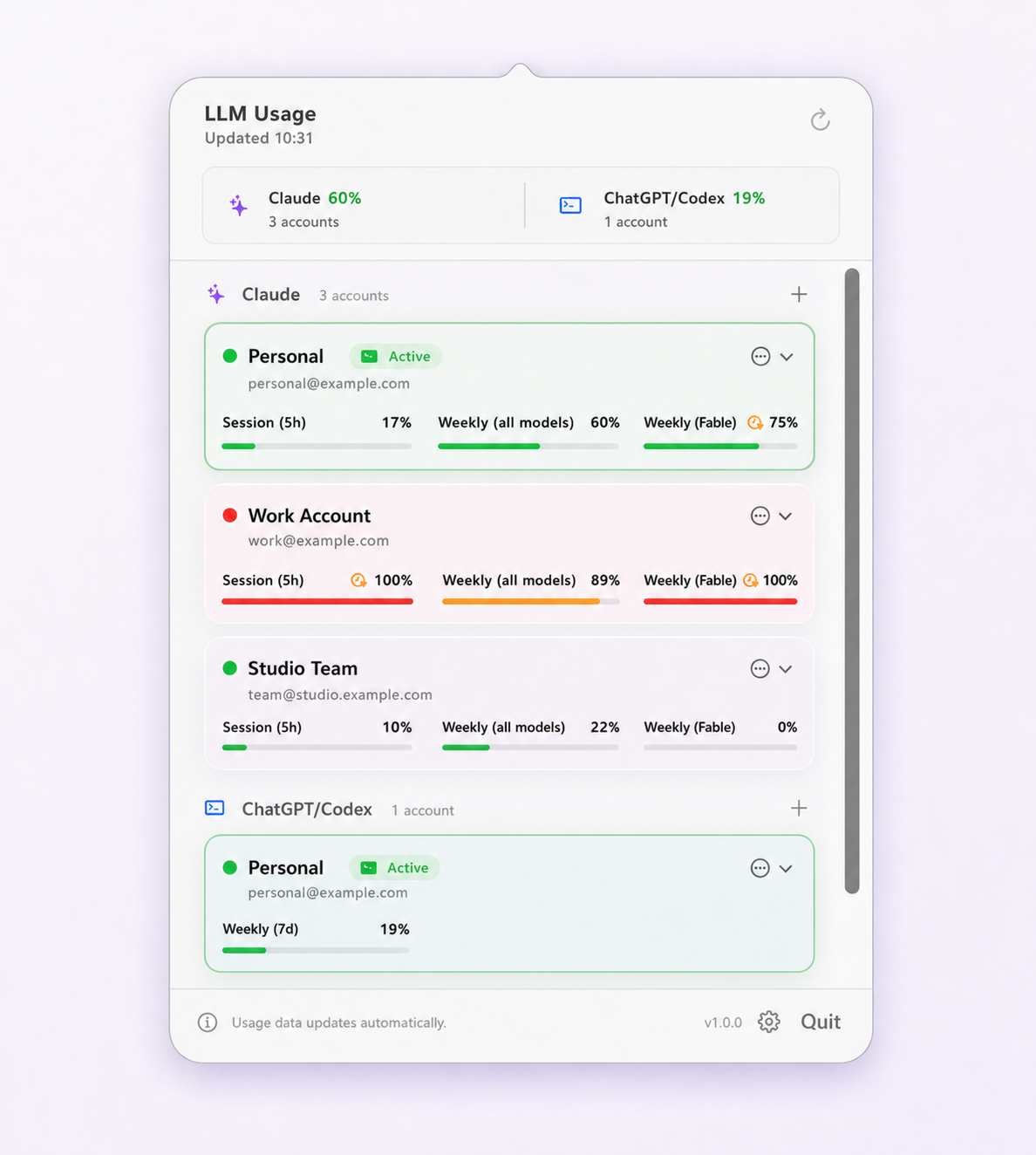
- Menu-bar monitors — poll the provider on a schedule and cache the result, so they can show several accounts at once. Their number is the provider's number, delayed by however long ago the poll ran.
Five reasons the numbers disagree
1. They are answering different questions
Spend and quota are not convertible. A cost tracker telling you that yesterday was worth $47 of API usage says nothing about how much of your weekly window remains, because the subscription does not meter in dollars. Both numbers are correct; only one of them can stop you working.
2. They are reading different windows
Claude Code reports several windows at once: a rolling session window of about five hours, a weekly all-models window, and weekly windows scoped to individual model families. A tool that displays only one of them will look wrong to anyone watching a different one. On Max, Team Premium and Enterprise Premium, Fable also appears as its own weekly row, even though its usage counts against the same weekly limit. Codex windows are labelled from the durations OpenAI reports rather than a fixed pair, and Pro plans currently expose only a weekly window.
3. The session window rolls
The five-hour window is not a bucket that empties at a fixed time. It rolls, so older activity ages out continuously and remaining capacity climbs back on its own. Two readings taken minutes apart can legitimately differ, and remaining usage going up while you sit still is expected behaviour rather than a bug.
4. One of them is cached
Everything that shows several accounts at once is showing you cached data, because polling the provider continuously for every saved account is neither free nor kind. The question is not whether a tool caches — they all do — but whether it tells you how stale the number is.
5. They are looking at different accounts
The most common cause and the easiest to miss. Your browser, your desktop app and your CLI each hold their own session, and the CLI's identity is the only one that governs what the CLI spends.
Which window actually stops you
The tightest one. That is the whole rule, and it is why a single headline percentage is misleading: 60% remaining on the session window is irrelevant if the weekly all-models window is at 4%.
A percentage on its own is also not enough to plan around. What makes a reading actionable is the combination of the number, the reset time, and the pace — how fast the current window is being consumed relative to how much time is left on it. Forty percent remaining is comfortable on a Monday and a problem on a Friday afternoon if the last hour consumed fifteen points.
For what each Claude window measures and how each one rolls over, see Claude Code usage limits explained; for the Codex equivalents and earned rate-limit resets, see Codex CLI rate limits explained.
Reading age is a feature, not a detail
A tool that shows a cached percentage as though it were live is worse than one that shows nothing, because it invites you to commit an hour of work to a number from half an hour ago.
Limit Lifeboat refreshes every 5 minutes by default, adjustable to 2, 5, 10, 15, 30 or 60 minutes, and accelerates to every minute when an active account reaches 90% session usage or 94% weekly usage — even when automatic switching is off. Any reading older than 30 minutes is marked stale rather than displayed as current, and an account whose saved login has failed keeps its last successful reading with the age attached instead of silently showing a number it cannot justify. Local usage history is retained for 30 days, up to 5,000 records per account, and exports to CSV with identity fields such as emails and organization names deliberately omitted.
Questions and boundaries
Why does a cost tracker show a different number from /usage?
Because they answer different questions. Cost trackers such as ccusage read your local session logs and report what that activity would have cost at API prices. /usage reports how much of your subscription window you have consumed. Neither converts into the other, and a subscription plan has no dollar figure to compare against, so the two numbers will never agree.
Which usage number should I trust?
The provider's own display, always. Whenever a local view and the provider disagree, the provider is right. Everything a third-party tool adds — multiple accounts at once, reading age, consumption pace — is context around that number, not a replacement for it.
Why did my remaining usage go up without me doing anything?
The Claude Code session window rolls continuously rather than resetting at a fixed time, so capacity returns gradually as older activity ages out of the window. Two readings a few minutes apart can legitimately differ in your favour. The weekly window has a definite reset point and does not behave this way.
How old is too old for a usage reading?
Old enough that you would not bet an hour of work on it. Limit Lifeboat marks anything over 30 minutes as stale rather than presenting it as current, and shows the age of every reading. A percentage without an age attached is not enough information to plan a long task around.
Does checking usage consume a meaningful part of the limit?
No coding prompt or model turn is submitted. Codex readings use the locally installed Codex app server's rate-limit request, while Claude uses provider usage services with a local Claude Code usage fallback.
Why can an inactive account show an older reading?
A saved login can expire, Keychain may deny background access, or a provider request can fail. Limit Lifeboat keeps the last successful reading and shows its age rather than presenting stale data as live.