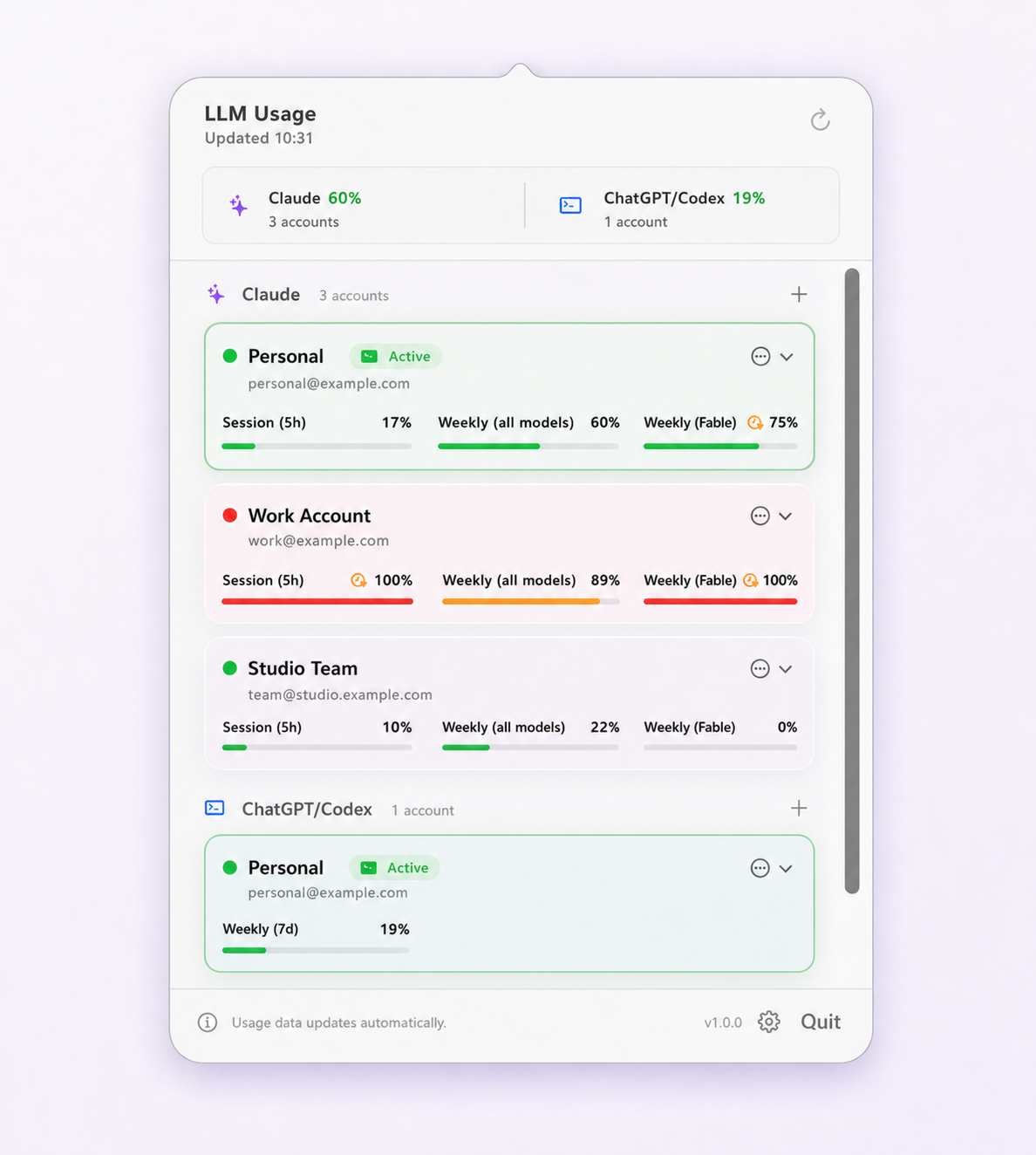
First, find out which window ran out
"Limit reached" is not one state. Claude Code tracks a rolling session window of about five hours, a weekly window covering all models, and weekly windows scoped to individual model families. Any of them can stop you, and each has a different cheapest fix.
/usageThat reports every window along with its reset time. The usage limits reference explains what each one measures. Skipping this step is how people spend four hours waiting for a session window when they could have changed model and carried on.
The error text often tells you already: a per-model weekly limit shows up as
"You've hit your Opus limit" or the
Sonnet equivalent rather than a generic limit message. Recent Claude Code versions also add
/rate-limit-options (2.1.284) for the choices available at that point.
The five options
1. Wait for the window to reset
Free, and correct more often than the internet suggests. The important nuance is that the session window rolls: capacity from roughly five hours ago frees up gradually, so you do not have to wait for a single reset moment before doing anything at all. A weekly window is different — that one has a definite reset point and waiting can mean days.
One exception is worth checking for. Alongside Opus 5.5 on 22 September 2026, Anthropic gave subscribers a saved rate-limit reset to use when they choose. The details beyond that are thin, so check your own account before counting on it, but if you still have it, a week-ending weekly limit is the moment it was made for.
2. Change model
Only relevant when a model-scoped weekly window is the constraint, but when it is, this is the fastest fix available. The all-models weekly window frequently still has room while a heavier model's own window is exhausted. Costs nothing, takes seconds.
3. Buy usage credits or move up a tier
Usage credits
(Anthropic renamed them from "extra usage") and higher plan tiers are the sanctioned routes to
more capacity on the account you are already using. Credits are available on Pro, Max 5x and
Max 20x, are billed at API rates, and can be capped with an optional monthly spend limit; turn
them on in claude.ai under Settings > Usage or with /usage-credits in Claude
Code. Since 2.1.234, Claude Code also has a "Continue automatically at usage limit" option in
/config (managed setting autoContinueAtUsageLimit).
One cost detail: on a subscription, the main conversation's prompt cache lives for an hour while you are within your plan, but drops to five minutes while you are drawing on usage credits, so pauses between turns cost more. If you hit the weekly window most weeks, a higher tier is the answer rather than a workaround — you are simply on too small a plan for your workload.
4. Switch to API billing
API access is billed per token instead of being capped by a subscription window, so it will not stop you. It is also the most expensive option for sustained work. Treat it as the escape hatch for something genuinely time-critical rather than as a default.
5. Move to another account you are authorized to use
If you already hold a second account — most commonly an employer-provisioned one alongside a personal one — it has its own separate allowance. Switching the CLI to it does not add capacity to the exhausted account, merge the two, or change either reset time; each account's limit stays tracked and enforced by Anthropic independently.
Two conditions apply before this is a real option. Use only accounts you are authorized to use, and follow whatever policy your employer sets for the account they gave you. What the terms actually prohibit covers where the line sits. Then, mechanically: switching the CLI login should change authentication and nothing else, or you will trade a usage problem for a configuration one.
Choosing between them
| Situation | Best first move |
|---|---|
| Model-scoped window empty, others fine | Change model. Immediate and free. |
| Session window empty, nothing urgent | Wait. Capacity returns gradually over the next few hours. |
| Session window empty, something urgent | Another authorized account, or API billing. |
| Weekly window empty, first time this month | Usage credits, or wait for the reset. |
| Weekly window empty most weeks | Move up a plan tier. The workload has outgrown the plan. |
Not being caught again
Hitting a limit mid-task is expensive because of where it happens, not because of the wait. Three habits make it rare:
- Check before a long task. You cannot know what a task will cost, but you can know how much room you have before starting it.
- Watch pace, not just percentage. Forty percent remaining means something very different if the last hour consumed fifteen points. Local history makes the trend visible.
- Get warned early. A notification at 80% consumed is worth more than an error at 100%.
Limit Lifeboat covers all three from the menu bar: every saved account's tightest window, how old each reading is, recent pace, and optional warnings as an account nears its limit or becomes available again. It can also switch accounts automatically, though that is off by default — when enabled it triggers at 5% session remaining or 1% weekly remaining, follows your saved priority order, and requires the target to have at least 30% headroom and to be at least 20 points better than the account you are leaving.
More on which of those numbers to trust in why usage numbers disagree, and on confirming the account you moved to in how to check which account is active.
Questions and boundaries
Can I reset the Claude Code weekly limit early?
Normally, no. The weekly window is enforced by Anthropic and you wait for it to roll over. The one exception so far: with Opus 5.5 in September 2026, Anthropic gave subscribers a saved rate-limit reset they can use when they choose. Otherwise, the supported routes to more capacity are usage credits (formerly extra usage) and higher plan tiers.
How long until my Claude Code limit resets?
Run /usage inside Claude Code; it reports the reset time for each window. The session window rolls, so capacity returns gradually rather than all at once, while the weekly window has a definite reset point.
Will switching to another account give me more total capacity?
It gives you access to that account's own separate allowance, which the provider tracks and enforces independently. It does not add capacity to the exhausted account, merge the two, or change either reset time. Use only accounts you are authorized to use.
Does dropping to a cheaper model help?
It does when a model-scoped weekly window is what ran out, because the all-models window may still have room. It does not help if the session window or the all-models weekly window is the constraint.
Is it worth switching to API billing when I hit a limit?
It is the reliable escape hatch for urgent work, since API access is billed per token rather than capped by a subscription window. It is also the most expensive option for sustained use, so it suits finishing something time-critical rather than becoming the default.