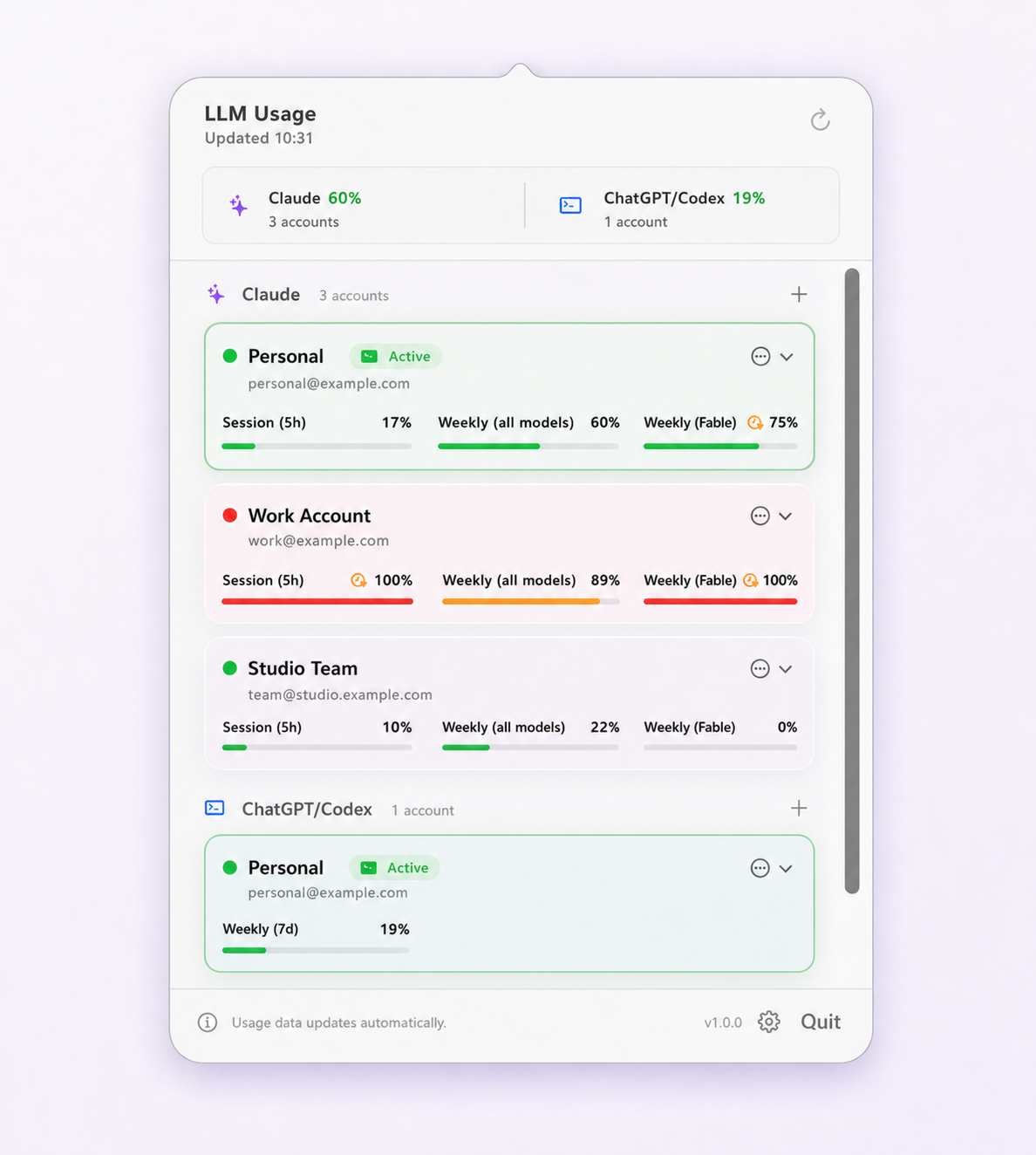
How Codex reports its windows
Where Claude Code names its windows, Codex describes them by duration. A tool reading Codex usage sees a window length in minutes and infers the semantics from that: a window of a day or less behaves as a short rolling session window, anything longer behaves as a multi-day one.
This is worth knowing because it means any article stating “Codex has a 5-hour and a 7-day limit” is describing one common configuration rather than a rule. Pro plans currently expose only a weekly window with no short companion, and Plus went without its 5-hour window from 13 July to 25 August 2026 before OpenAI reinstated it. Limit Lifeboat labels each window from the duration OpenAI actually returned for your account, which is why the labels you see may not match a screenshot from somewhere else.
The practical instruction is the same either way: read the windows your account reports, and treat the tightest one as the constraint.
Earned rate-limit resets
This is the Codex-specific feature that is least well documented elsewhere. OpenAI can grant a ChatGPT-authenticated account reset entitlements, reported through the locally installed Codex app server. Redeeming one restores capacity that OpenAI has already decided to give you.
Three things are worth being precise about, because they are easy to misrepresent:
- They are provider-issued. No third-party tool creates them, and no tool can turn paid usage credits into resets. A client can only display and redeem what OpenAI reports.
- They are not a bypass. Redeeming a reset is a supported subscription feature. It does not circumvent a rate limit, and it does not change how OpenAI enforces one.
- They may not exist for your account. The capability appears only when your installed Codex version and the backend expose it. If they do not, there is nothing to show.
In Limit Lifeboat, a Codex account displays OpenAI's authoritative available count when the
capability is present, along with any titles, descriptions, and expirations OpenAI returned.
Manual redemption always asks for confirmation. Automatic redemption is off by default and is
enabled per account; when enabled it applies only to the active Codex account and only after a
fresh hard rate_limit_reached response — not merely when a limit is close. In that
case the reset runs before any automatic account switch is considered.
OpenAI documents the capability in its app-server documentation.
Plans, auth methods, and what they change
Codex inherits the limits of whichever authentication path you use, and the paths are not interchangeable:
- ChatGPT subscription login. Uses your plan's allowance. Codex is available on Free, Go, Plus, Pro, Business, and Enterprise/Edu. Pro comes in $100, $200 and $500 tiers, which Codex labels Pro, Pro (More) and Pro (Max), and carries substantially higher ceilings than Plus.
- API key login. Uses metered API billing instead of a subscription allowance, with its own separate limits. Usage windows in the subscription sense do not apply.
OpenAI covers the subscription side in Using Codex with your ChatGPT plan, and the credential stores in Codex authentication. Limit Lifeboat reports subscription usage windows; it does not estimate API spend or translate subscription activity into API prices.
Reading Codex capacity accurately
Run /usage inside the interactive Codex CLI for the authoritative view. OpenAI
also directs users approaching a limit to the Codex usage page or the in-product banner. How
much a task consumes varies with its size, complexity, the model, and where it runs, so a
remaining percentage is a budget rather than a task count.
Since Codex CLI 0.152 the limit banner also offers options to check usage, manage credits,
reset limits, or change plan, and 0.156 turned /usage into a fuller dashboard with
token totals, credits, and plan usage history.
Two accuracy notes if you are reading Codex usage from a menu-bar tool. First, the reading has an age: a saved account that is not currently active can only report its last successful fetch. Second, Codex readings are taken through the locally installed Codex app server, so a Codex install that is missing or out of date changes what can be read at all. Recent local session data serves as a fallback for the active account, but it cannot expose or redeem resets.
If you are running more than one Codex account, the multiple Codex accounts guide covers verifying which login the CLI is really on. For the Claude equivalent of this page, see Claude Code usage limits explained.
Questions and boundaries
What are earned rate-limit resets in Codex?
They are reset entitlements issued by OpenAI to a ChatGPT-authenticated account and reported through the Codex app server. Redeeming one restores capacity that OpenAI has already granted. They are a provider feature, not a bypass: no third-party tool can create a reset, and redeeming one does not circumvent a limit.
Does Codex CLI have a 5-hour limit like Claude Code?
Sometimes. Codex reports its windows with explicit durations rather than fixed names. Pro plans currently have no 5-hour window, only a weekly one, and Plus lost its 5-hour window on 13 July 2026 before OpenAI reinstated it on 25 August. Because OpenAI changes this, read the durations your own account returns rather than assuming a fixed pair.
How do I check Codex usage from the terminal?
Run /usage inside the interactive Codex CLI. Since Codex CLI 0.156 it opens a dashboard covering account usage, token totals, credits, and plan usage history, alongside any available rate-limit resets. The Codex usage page and the in-product limit banner show the same information.
Do Codex limits differ between ChatGPT Plus and Pro?
Yes. Codex inherits the limits of whichever plan the account is on (Free, Go, Plus, Pro, Business, or Enterprise/Edu), and the tiers differ substantially; Pro currently has only a weekly window, where Plus also has a 5-hour one. An API-key login is billed and limited differently again, on metered API pricing rather than a subscription allowance.
Does checking Codex usage consume part of the limit?
No coding prompt or model turn is submitted. A usage reading uses the locally installed Codex app server's rate-limit request, which reports state rather than performing work.